Ubuntu Forums Archive Viewer

Linux first try - thoughts and questions

Archived thread 1015118 from Testimonials & Experiences. Markdown source: Testimonials_&_Experiences/thread_1015118_Linux_first_try_-_thoughts_and_questions.md

Original URL About this archive
#1

Ok, last weekend I suddenly got the idea that I'd try installing a version of linux on my computer after having been Microsoft-only for about 16 years. After surfing a few hours, I thought I'd give Ubuntu a whirl as a first outing. I am building a new computer sometime soon, and this distribution would probably be just right for me, but before that happens I want to get familiar with Linux in general and Ubuntu in particular.

So, after creating a CD I installed Ubuntu as a second OS on an XP machine, and after only one false start I got it running. Or so I thought.

My first impression was "huh?" as the OS failed to initialise properly. 'Dropping to shell'. Right. A few minutes on my stand-by laptop and the forums here gave me the "exit"-command, which worked. The OS loaded.

My second first impression was "cool". It looks snazzy, and although somewhat unfamiliar but still using to me well-known layouts was good. Excellent start.

Then I started playing around with some commands when the OS told me I had a bazillion updates to get. Ok, fair enough. I sat back and expected to be there for the usual 249 minutes MS update procedure, but was pleasantly surprised. It was easy, and quick with no hassles. Good work!

I then played around some more and found the synaptic tool, f-spot, and some other very nice stuff. I downloaded Opera and had no problems getting that to run. Everything seems to work fine apart from a few things.

Fonts Things don't look as "good" as I'm used to. Arial, Times New Roman etc are missing. Or at least, I can't find them. Are they proprietary and unavailable? Or could I buy them someplace? I must admit I haven't tried all the default fonts in the OS, but a lot of the web pages I have accessed do not look "right". I suppose this is a matter of personal preference, but it is important to me, and I wager I am not alone in this coming from a Microsoft background.

The graphics card My graphics card (ATI Radeon 9550 / X1050 Series) isn't working properly, or rather, not as well as it should. It is about four years old, so it sure has some kinks when I run XP, but the drivers provided with Ubuntu are quite frankly bad. Every graphical detail is slow, and feels "unwieldy". For instance, it takes f-spot 2-3 seconds to rend a 1MB photograph whereas IrfanView on XP does it unnoticably quick; and the "fold-in" effect when I close a programme looks cumbersome for the system, for the lack of a better word. After fiddling with this for a while I found that there were proprietary drivers from the manufacturer that weren't enabled by default. Having enabled these drivers and rebooted, things actually became worse(!). Now suddenly, I couldn't change my screen resolution, and everything was still working as in syrup. I know that using an old graphics card won't win me any points, but if a bloated and rather slow OS such as XP can handle all this running on my hardware, shouldn't a supposedly sleeker and more efficient OS be at least equally good?

Dropping to Shell-error What does it even mean? Why does it work after I type "exit"? Why can't the OS do this by itself? I know I'm not alone with this problem, as a quick search of the forums acknowledges, but this is a hurdle that most newbies who try this OS will stumble on, and fall hard.

I am still on the positive side of Ubuntu, and I'm sure I've misunderstood a lot, but I'm still waiting for that "wow"-feeling. :D
#2

As far as fonts go you need to enable the universe repository (System->Administration->Software Sources; then check the box that has the word universe in it) Then use synaptic to install 'msttcorefonts'. edit: You may need multiverse as well Or from the command line ``` sudo apt-get install msttcorefonts


As far as your ati card goes I use an Nvidia and it works like a dream after install the restricted driver so I can't be of any help on that issue.
#3

You can install the Micro$oft fonts if you desire by enabling the multiverse repo and doing a sudo apt-get install msttcorefonts. (Or via the Synaptic manager, if that's what you prefer.)

I have a NVidia card myself and have heard a lot of bad things about the ATI drivers. It's a manufacturer issue, neither ATI nor NVidia care too much about us GNU/Linux users...

Never heard about your "exit" issue.

I suggest you read the link in my signature for the wow effect.

#4

another thing about font quality... if you have an LCD and you haven't done this yet, you might notice some improvement

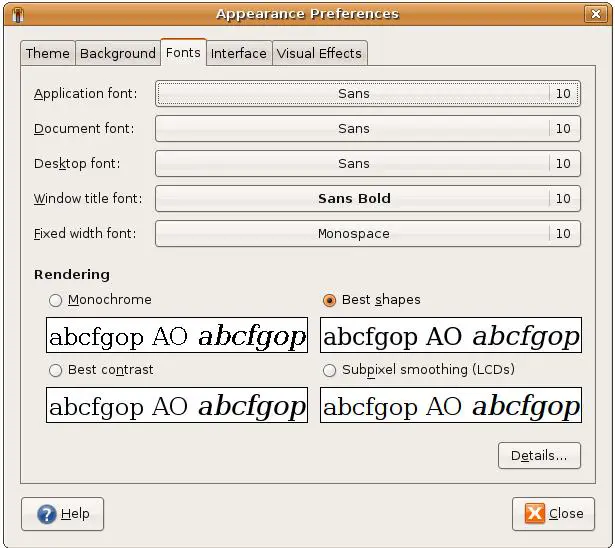
go to System > Preferences > Appearance and click the Fonts tab. Switch the "rendering" mode from "best shapes" to "sub-pixel smoothing."

That said, i think it still isn't quite as nice as Microsoft ClearType which is fairly unbeatable once you have it properly tuned.

when you get the "dropping to shell" message, are there any other messages on the screen?

If you go to Applications > Accessories > Terminal and type ``` dmesg > ~/dmesgOutput.txt

#5

I've used an ATI card before and the proprietary drivers you get by going to administration > hardware drivers don't work very well (at least for me). To get my ATI card working I had to download them from the ATI website directly. http://ati.amd.com/support/driver.html Oh, I have a radeon X700 video card BTW.

#6

Welcome to Ubuntu and too the forums. Let me see if I can offer anything helpful.

RE: ATI drivers. I'm an nVidia guy, but I'm wondering if you have the ATI Restricted driver installed. If you click on System/Administration/Hardware you should be able to determine that. If you are not, clicking "ON" the "Enable" box should start the install process for you. If they are installed and enabled we can proceed.

Click on System/Appearance and then on the Fonts tab you can try turning on "Subpixel Smoothing" and see if you prefer that particular font rendering any. How to install the Microsoft fonts you're not yet finding has already been explained.

As for the "wow" feeling... Well that all depends. Maybe Ubuntu won't "wow" you; you wouldn't be the first since Ubuntu isn't going to be everyone's cup of proverbial tea. Try it on for size and see what you think. If you want to stick with it, there are few more steps I would suggest you take, but this should get you started at least.

Good luck and have fun!

#7

donkyhotay said: I've used an ATI card before and the proprietary drivers you get by going to administration > hardware drivers don't work very well (at least for me). To get my ATI card working I had to download them from the ATI website directly.

http://ati.amd.com/support/driver.html Oh, I have a radeon X700 video card BTW.

I tried that once...my X1300 decided the ones from Ubuntu were good enough. The whole white screen/crashed computer thing didn't bode well with me. :P

Ibex introduced CCC for ATI, which is nice. :)

#8

glotz said: You can install the Micro$oft fonts if you desire by enabling the multiverse repo and doing a sudo apt-get install msttcorefonts. (Or via the Synaptic manager, if that's what you prefer.)

Thank you, I think. But I honestly have no idea what a "sudo apt-get" is.

glotz said:

Never heard about your "exit" issue.

http://ubuntuforums.org/showthread.php?t=965678&highlight=dropping+shell

#9

jerome1232 said: As far as fonts go you need to enable the universe repository (System->Administration->Software Sources; then check the box that has the word universe in it) Then use synaptic to install 'msttcorefonts'.

edit: You may need multiverse as well Or from the command line ``` sudo apt-get install msttcorefonts


Thank you! As I wrote above, I am not "there yet" regarding command line execution in linux. But I'll try enabling the universe repository etc!
#10

Frederyck said: Thank you, I think. But I honestly have no idea what a "sudo apt-get" is.

sudo apt-get is a command to use apt, the package manager for ubuntu. Synaptic is one of its front ends. sudo is how you use admin mode in ubuntu.

#11

decoherence said:

when you get the "dropping to shell" message, are there any other messages on the screen?

If you go to Applications > Accessories > Terminal and type ``` dmesg > ~/dmesgOutput.txt


I haven't done what you are suggesting to be able to copy exactly what I see, but the message I get is pretty similar to this one from the quoted thread 
([http://ubuntuforums.org/showthread.php?t=965678&highlight=dropping+shell):](http://ubuntuforums.org/showthread.php?t=965678&highlight=dropping+shell):)

*********
Gave up waiting for root device. Common Problems:
-Boot argd (cat .proc/cmdline)
-Check rootdelay= (did the system wait long enough?)
-Check root= (did the system wait for the right device?)
- Missing modules (cat /proc/modules; ls/dev)
ALERT! /dev/disk/by-uuid/c420f507-9cf4-403a-a99b-695ce283cf4b does not exist. Dropping to a shell!

BusyBox v 1.10.2 (Ubuntu 1:1.10.2-1ubuntu6) built-in shell (ash)
Enter 'help' for a list of built-in commands.

(initramfs)
*********

The /dev/disk/by-uuid/"bla bla bla hex code bla bla" is not the same.
#12

It really is multiverse.

$ apt-cache show msttcorefonts
Package: msttcorefonts
Priority: optional
Section: multiverse/x11
Installed-Size: 196
Maintainer: Ubuntu MOTU Developers <ubuntu-motu@lists.ubuntu.com>
Original-Maintainer: Thijs Kinkhorst <thijs@debian.org>
Architecture: all
Version: 2.4
Depends: wget, cabextract, xfonts-utils, debconf (>= 1.4.69) | cdebconf, defoma
Recommends: x-ttcidfont-conf
Filename: pool/multiverse/m/msttcorefonts/msttcorefonts_2.4_all.deb
Size: 35096
MD5sum: 432aa20105c60e39b0072858b1187646
SHA1: 7a5e1e5677669ee7e36fce0e7930d462311c49ae
SHA256: ce9b10f5c749d0d825d1f5718fd826d8bddc0fa77db0ef311119f6a2d7d92b8f
Description: Installer for Microsoft TrueType core fonts
 This package allows for easy installation of the Microsoft True Type
 Core Fonts for the Web including:
 .
   Andale Mono
   Arial Black
   Arial (Bold, Italic, Bold Italic)
   Comic Sans MS (Bold)
   Courier New (Bold, Italic, Bold Italic)
   Georgia (Bold, Italic, Bold Italic)
   Impact
   Times New Roman (Bold, Italic, Bold Italic)
   Trebuchet (Bold, Italic, Bold Italic)
   Verdana (Bold, Italic, Bold Italic)
   Webdings
 .
 You will need an Internet connection to download these fonts if you
 don't already have them.
Bugs: mailto:ubuntu-users@lists.ubuntu.com
Origin: Ubuntu

That apt-get thingy is the incantation to be used on the command line as you expected. Don't worry about it, it's just another tool, you'll get the hang of it one day.

#13

donkyhotay said: I've used an ATI card before and the proprietary drivers you get by going to administration > hardware drivers don't work very well (at least for me). To get my ATI card working I had to download them from the ATI website directly.

http://ati.amd.com/support/driver.html Oh, I have a radeon X700 video card BTW.

Thank you! I will try this!

#14

Therion said: Welcome to Ubuntu and too the forums. Let me see if I can offer anything helpful.

RE: ATI drivers. I'm an nVidia guy, but I'm wondering if you have the ATI Restricted driver installed. If you click on System/Administration/Hardware you should be able to determine that. If you are not, clicking "ON" the "Enable" box should start the install process for you. If they are installed and enabled we can proceed.

Click on System/Appearance and then on the Fonts tab you can try turning on "Subpixel Smoothing" and see if you prefer that particular font rendering any. How to install the Microsoft fonts you're not yet finding has already been explained.

As for the "wow" feeling... Well that all depends. Maybe Ubuntu won't "wow" you; you wouldn't be the first since Ubuntu isn't going to be everyone's cup of proverbial tea. Try it on for size and see what you think. If you want to stick with it, there are few more steps I would suggest you take, but this should get you started at least.

Good luck and have fun!

Thank you! I feel very well taken care of already! :D

Regarding the ATI driver - I have already tried enabling the proprietary drivers, and they didn't work either, but will try the web site download mentioned as well.

As for the wow-feeling, I suppose/hope that will come when I actually start to "get" the system. For me, I still have a "just a different version of Windows"-feeling, and haven't really gotten into the minutae where I think the real gains can be found. I have only used Linux for about four hours net, including the installation. :)

#15

SunnyRabbiera said: sudo apt-get is a command to use apt, the package manager for ubuntu.

Synaptic is one of its front ends. sudo is how you use admin mode in ubuntu.

Ok, thanks! I think I'll stick to the front ends during these first couple of days, though! :D

#16

glotz said: It really is multiverse.

Ah. Bigger is better, I suppose. ;)

glotz said:

That apt-get thingy is the incantation to be used on the command line as you expected. Don't worry about it, it's just another tool, you'll get the hang of it one day.

I hope I have the patience for that! :)

#17

Frederyck said: Thank you! I will try this!

donkyhotay said: I've used an ATI card before and the proprietary drivers you get by going to administration > hardware drivers don't work very well (at least for me). To get my ATI card working I had to download them from the ATI website directly.

http://ati.amd.com/support/driver.html Oh, I have a radeon X700 video card BTW.

Hm, I've found and downloaded a set of drivers (ati-driver-installer-8-10-x86.x86_64.run), but I honestly have no idea what to do with it. The windows-user in me just want to click on it to run it, but that doesn't work, and when I look in the install instructions from amd they tell me to:

1 Launch the Terminal Application/Window and navigate to the ATI Propri- etary Linux driver you have downloaded. 2 Enter the command sh ./ati-driver-installer-8-10-x86.x86_64.run to launch the ATI Proprietary Linux driver installer.

This is probably child's play even for most novices arounf here, but I don't even know where to start. I have no troubles using command lines per se, but here I am stumped!

#18

Frederyck said: Hm, I've found and downloaded a set of drivers (ati-driver-installer-8-10-x86.x86_64.run), but I honestly have no idea what to do with it. The windows-user in me just want to click on it to run it, but that doesn't work, and when I look in the install instructions from amd they tell me to:

1 Launch the Terminal Application/Window and navigate to the ATI Propri- etary Linux driver you have downloaded. 2 Enter the command sh ./ati-driver-installer-8-10-x86.x86_64.run to launch the ATI Proprietary Linux driver installer.

This is probably child's play even for most novices arounf here, but I don't even know where to start. I have no troubles using command lines per se, but here I am stumped!

I would have tried:

 sudo ./ati-driver-installer-8-10-x86_64.run 

from the directory where the file is stored. But I think you can just double click and choose "Run in Terminal."

Good luck!

#19

I am sorry if I am tedious, but it seems that my standard install of the OS didn't give my user super admin rights, and I don't seem to recall any mention of the root user. Is it possible to solve that?

#20

It's actually by design, read e.g. this https://wiki.ubuntu.com/RootSudo

#21

glotz said: It's actually by design, read e.g. this https://wiki.ubuntu.com/RootSudo

I learn by the minute! :guitar:

#22

Hi and welcome to ubuntu. I personally use Nvidia as well, I don't believe this has been mentioned but you may want to try EnvyNG it supports Nvidia and ATI and will download and install the proper drivers for your system.

#23

MetalHellsAngel said: Hi and welcome to ubuntu. I personally use Nvidia as well, I don't believe this has been mentioned but you may want to try EnvyNG it supports Nvidia and ATI and will download and install the proper drivers for your system.

Thank you. I will probably do this, but I need some more experience first as I didn't get all the instructions, I think.

#24

Envy is pretty simple. You can install it from synaptic package manager. System > Admin > Synaptic , just type Envy into the search function, click on the box to the left, mark for install, apply.

Once it is installed select ATI, select your model, then install.

#25

I was about to suggest exactly that, I run ubuntu with an ATI card (rdn HD 3850) and envy sorts out all my issues,(except a little compiz related one). envy is a nice user friendly program and it should be easy enough to use.

if you running ubuntu you might wanna install envyng-gtk, if you are running kubuntu, thenn envyng-qt, these packages can be found with a search in synaptic.

gl

#26

Thank you all!

Now the system looks much better, both font-wise and graphics-wise!

#27

stalkingwolf said: Envy is pretty simple. You can install it from synaptic package manager.

System > Admin > Synaptic , just type Envy into the search function, click on the box to the left, mark for install, apply.

Once it is installed select ATI, select your model, then install.

Is it really that simple, though? My experience with ATI drivers (in Linux, anyway) is "DON'T TOUCH IT! EVER!"

Have there been any instances where Envy borked the OS install?

EDIT: Never mind. Still doesn't fix the one problem everybody has with ATI cards: no 3d/video when desktop effects are enabled. Only now I'm stuck with Envy. Tried to remove it, black screen at boot. Thankfully I knew enough about the command line to reinstall Envy, to get my graphics working again without having to reinstall the OS.

Guess I should have known better. After all, if it sounds too good to be true....

#28

Frederyck said: Thank you, I think. But I honestly have no idea what a "sudo apt-get" is.

[URL="http://www.psychocats.net/ubuntu/installingsoftware"] Installing software in Ubuntu.[/URL]

I am extremely surprised no one has posted this yet. Maybe I missed it.

#29

Thelasko said: [URL="http://www.psychocats.net/ubuntu/installingsoftware"]

Installing software in Ubuntu.[/URL]

I am extremely surprised no one has posted this yet. Maybe I missed it.

Thank you! Even though I think I am getting a hang of this, in some sense, this is a very good link!

#30

there is 2 links that i would highly recommend to learn more.

http://www.psychocats.net/ubuntu/ http://ubuntuforums.org/showthread.php?t=801404

you find them useful

#31

Just to give you an idea of the benefits of using Ubuntu. After a few months as a user there seems to be no file type that I can't open. There seems to be no movie that I can't play. There seems to be no music that I can't listen to. There seems to be nothing that I need or want to do that I can't do. And all it cost me was the time to research what I needed or sometimes to ask on the forums. It suits me and when it doesn't I will look for another Linux distro that does.